View Performance
Monitor your affiliate program metrics and partner results
Last updated Oct 16, 2026
Monitor program-wide metrics, identify top-performing partners, and spot issues before they impact revenue.
Performance Overview
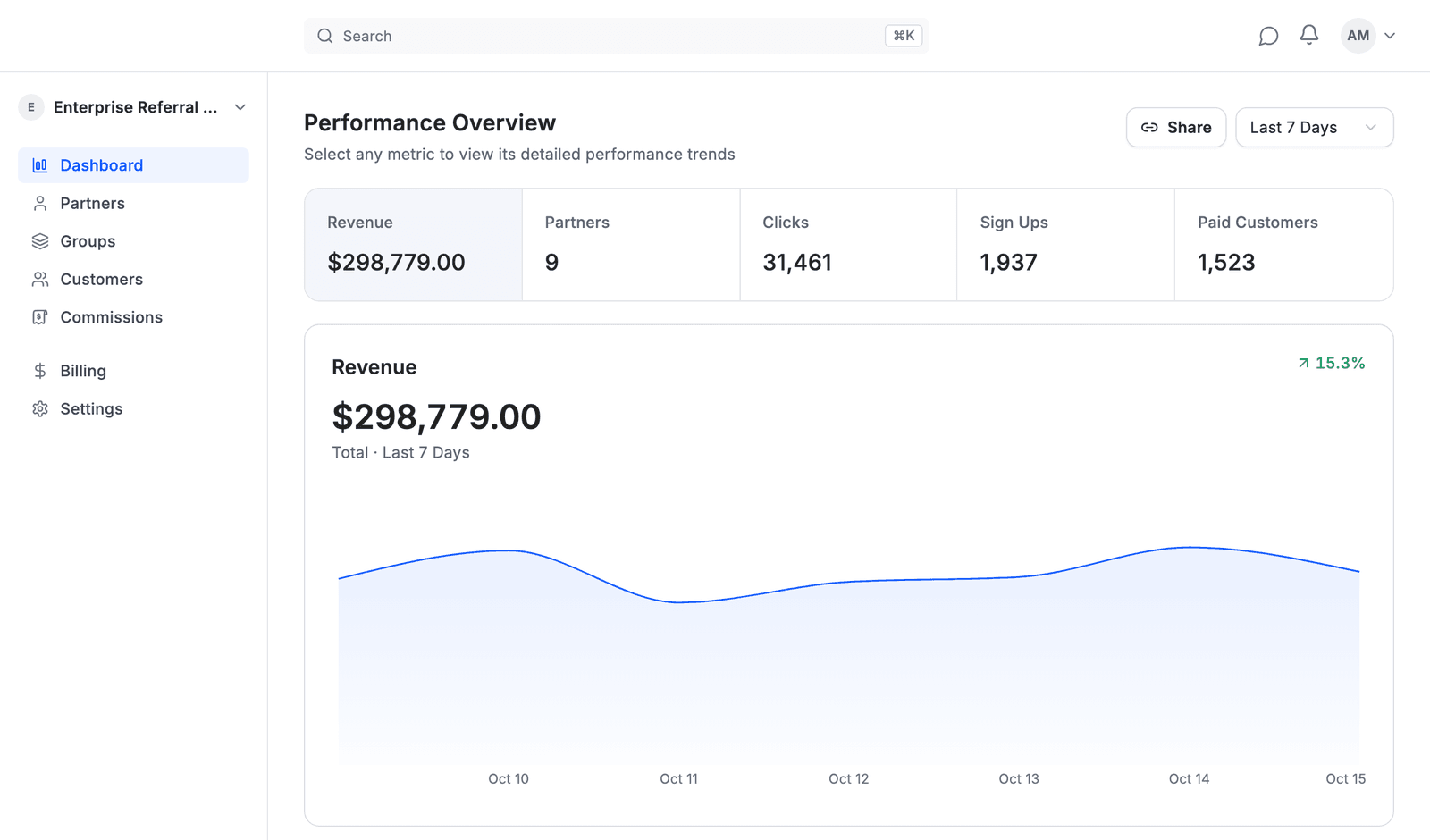
Your dashboard shows program-wide metrics at a glance:
| Metric | Description |
|---|---|
| Revenue | Total sales from affiliate traffic |
| Partners | Partners who joined your program in the period |
| Clicks | Visits from affiliate links |
| Sign Ups | Leads captured (registrations, form submissions) |
| Paid Customers | Conversions that generated revenue |
The chart below shows the selected metric's percentage change compared to the previous period. It shows no percentage when the metric did not change, or when it was 0 in the previous period, since growth from nothing has none.
Use the period menu to pick Last 7 Days, Last 30 Days, Last 90 Days or All Time.
Performance Charts
Click any metric to see its trend over time. The chart shows daily values across your selected date range.
Hover over data points to see exact values for specific dates.
Use charts to:
- Spot growth or decline patterns
- Identify your best-performing days
- Correlate spikes with campaigns or launches
Action Center
The Action Center shows items that need your attention:
- Pending partner applications – Review and approve or decline
- Quick actions: Approve or Decline directly from the dashboard
Click "View all" to see your full application queue.
Partner Performance
The Partners section breaks down results by individual partner:
| Column | What it shows |
|---|---|
| Partner | Name and contact info |
| Clicks | Traffic sent to your site |
| Signups | Leads generated |
| Paid Customers | Conversions |
| Revenue | Sales attributed to this partner |
| Conversion Rate | Lead-to-customer percentage |
Sorting & Filtering
- Sort by any column to find top performers
- Filter by date range to see recent activity
- Search by partner name
What the Numbers Tell You
| Pattern | What it means | Action |
|---|---|---|
| High clicks, low signups | Traffic quality issue or landing page mismatch | Review partner's promotion method |
| High signups, low paid | Leads aren't qualified or pricing friction | Check if partner targets right audience |
| High conversion rate | Partner sends qualified traffic | Consider higher commission tier |
| Zero activity | Partner hasn't started promoting | Send activation reminder |
Tracking Performance Over Time
Use date comparisons to spot trends:
- Week over week – Short-term momentum
- Month over month – Growth patterns
Look for:
- Which partners are growing vs. declining
- Seasonal patterns in your conversions
- Impact of promotions or product launches
About Data Access
Affitor operates as an affiliate network, not just a tracking layer. Your dashboard provides full performance and attribution reporting; exporting raw partner identity data is not supported.
Affitor owns partner sourcing, recruiting, and management. The dashboard gives you the insights needed to monitor performance and make program decisions.
Best Practices
- Check weekly – Catch issues early before they impact revenue
- Identify top performers – Your top 20% of partners likely drive 80% of results
- Spot inactive partners – Re-engage or remove partners with no activity for 30+ days
- Compare conversion rates – Partners with similar traffic but different conversion rates reveal quality differences
What's Next
- Partner Approval & Quality Control – Manage your partner base
- Payouts – See pending and completed partner payments